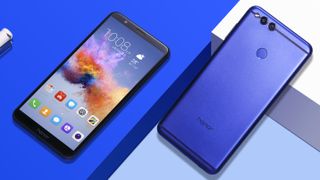
The Honor 7X is the new mid-range phone from the Chinese company and we've put together this guide to teach you everything you need to know about the latest handset.
It's a follow-up to the Honor 6X, which launched earlier this year at CES, and it also follows up on the success of the more expensive and high-tech Honor 9.
Below we'll run you through everything you'll need to know about the Honor 7X, including when it will be launching and what we know about how much it'll cost.
What is it? The latest mid-range phone from the Honor brandWhen is it out? December 5 for the UK, the rest of the world is unclearWhat will it cost? We don't know just yet, but we speculate just below
Honor 7X price and release date
We don't know the exact price for the Honor 7X yet, but we have been told by Honor that we should learn more very soon. We're expecting to see a similar price to the Honor 6X though, which launched at $249.99 (£229, about AU$390)
It may be that the brand is set to up the price a tiny bit from the Honor 6X, but we wouldn't expect a huge increase and we'll hopefully learn more in the coming weeks.
You'll be able to buy the 7X from December 5 in the UK, but the release date for Australia and the US is currently unclear.
Honor 7X design and display
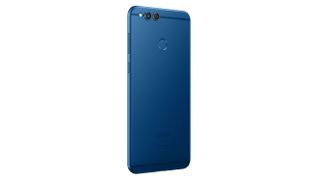
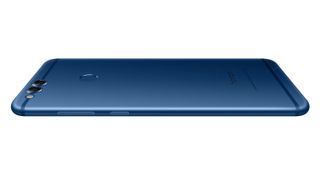
Honor has opted for a metal uni-body design here that's not as rounded as the Honor 6X and instead has a flat rear. We don't know the specifics when it comes to the size of the phone, but Honor claims it's 2.7mm thinner than the iPhone 7 Plus, which is a phone that's 7.3mm thick.
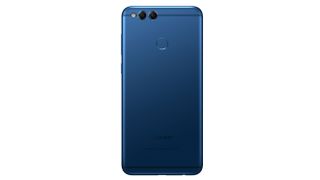
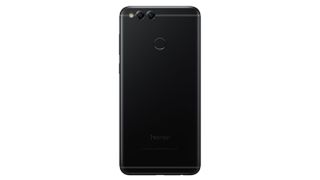
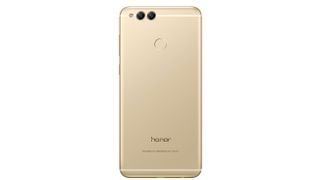
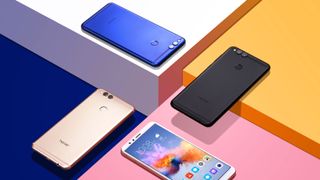
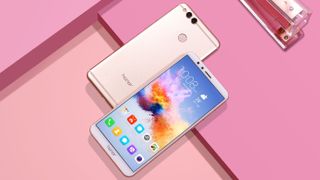
Color choices will be limited to blue and black in the UK, and we've yet to learn what the color options will be around the rest of the world. There is a gold option too, but it seems that will just be for China at the moment.
Image 1 of 3
Blue is the color option for the Honor 7X that you'll likely see the most.
The black version is also available, but stock may be a little more limited.
Gold will be an option for the Honor 7X, but so far it's limited to the Chinese market.
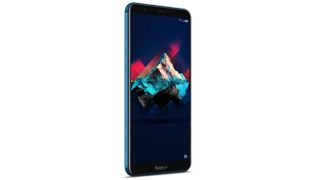
Honor has included an 18:9 ratio screen for the first time here. That means the phone is able to have a large display without increasing the size of the actual handset, and Honor has managed to fit a 5.93-inch display in what would usually house a 5.5-inch display.
The resolution is Full HD+, which means 2160 x 1080 and comes in at 408 pixels-per-inch.
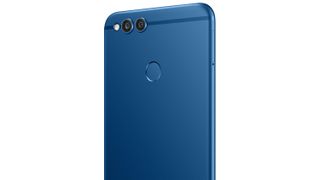
The bezels are thin on either side of the screen, and the fingerprint sensor is on the rear of the phone to ensure it's not taking up room on the front.
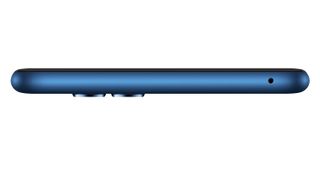
On the bottom edge of the phone you'll find the speaker, along with the micro USB port for charging and the 3.5mm headphone jack.
Below you can see a full look around the phone in our press image gallery
Image 1 of 6
Honor 7X camera
The Honor 6X was one of the first times we saw a dual-camera on the rear of a mid-range device and Honor has kept this going with the latest handset.
There's a 16MP rear camera that works alongside a 2MP depth-sensing camera. This allows for an improved wide aperture mode as well as a 'Portrait' mode for better looking photos of people.
On the front of the phone there's an 8MP shooter that comes with depth of field features to play around with, as well as selfie effects and a beauty mode.
Honor 7X power and specs
The phone is powered by Honor's latest homemade - but not top of the range - chipset that's called the Kirin 659.
That works alongside 4GB of RAM, which is a high amount for a mid-range phone. There's also 64GB of storage as standard, but you'll have to use the 256GB-capacity microSD card slot if you want to be able to use further storage.
That second slot can also be used for another SIM card alongside your original one if you need to have two running at the same time.
The phone also comes with Histen 3D spatial audio technology, and gamers might want to know that Modern Combat Versus has been optimized for the larger screen, but Honor doesn't seem to have plans to do this for any other games.
It runs Android 7, overlaid with the company's Emotion UI.
Honor 7X battery
The Honor 7X is packing a 3,340mAh cell, which is exactly the same size as the one inside the Honor 6X. Considering this is powering a phone with a larger screen we may see a bit of a detrimental effect on battery here, but the chipset should be better optimized, so we're hoping for a similar life.
Honor claims it'll last for 12 hours of constant video playback, but unlike the pricier Honor 9, there aren't any fast charge features included here.
Windows 10 will focus on better multitasking and an improved desktop experience
Update: Microsoft's Technical Preview
build, #9879, is the last release for 2014. Now, we play the waiting
game until January 21, 2015. That 's the day when Redmond will let loose
more details regarding Windows 10. Read more below!With Windows 8 and now Windows 8.1,
Microsoft tried – not entirely successfully – to make tablets part of a
continuum that goes from number-crunching workstations and high-end
gaming rigs through all-in-one touchscreen media systems and thin-and
light notebooks down to slender touch tablets.The
general consensus is that it still has a long way to go to produce a
unified OS. Recently, Microsoft publicly made the first steps to doing
just that, with Windows 10. Skipping the Windows 9 name entirely, the
Redmond, Wash. firm aims to step into the next generation of computing
with the right foot forward.You will soon be able to download Microsoft's Windows 10 Technical Preview by venturing over to its Windows Insider Program
website. You'll need a Microsoft account to get it, and it's worth
bearing in mind that it's not the finished article so may be a bit rough
around the edges.
Is the new OS any good? Read our hands on Windows 10 review
While
there is little information regarding the Windows 10 Road Map currently
available following the event and the Technical Preview, this is what
we know so far regarding the stymied release of Windows 10:
The event
on September 30 announced the release of the Technical Preview of
Windows 10 for laptops and desktops, often referred to as WTP, DP
(Developer Preview) or CTP (community technology previews). This is just
over three years after Microsoft unveiled the first public beta build
of Windows 8, known as Windows Developer Preview).
Microsoft
released its Windows Insider Program on October 1st, designed to keep
early adopters up to date with the latest preview builds of Windows 10.
Starting with Technical Preview for laptops and desktops, the preview build will extend to servers short after.
As of October 7, the preview build is available to Windows 7 users as well.
Consumer preview builds will not be available until early next year, according to Microsoft's Terry Myerson.
The Technical Preview will end sharply on April 15 of next year, which conveniently leaves right off at...
Microsoft's
Build 2015 conference next April, at which the company will talk more
about Universal Apps and likely issue a Windows 10 release date.
Finally, the company promises that Windows 10 will ship to consumers and enterprise "later in the year" in 2015, Myerson said.
We'll learn more about that on January 21, when Microsoft holds an event on its Redmond campus detailing even more about Windows 10, especially for consumers.
Cut to the chase What is it? A complete update of Windows When is it out? It will launch "later in the year" in 2015 What will it cost? We really have no idea. Microsoft will not comment on pricing yet.
Read all about Windows Phone 9 and Office 365 right here.
A million testers in and...
Microsoft announced on October 13 that over 1 million folks
are currently testing out the Windows 10 Technical Preview. So far, the
testers have been "a vocal bunch," according to Redmond's Joe Belfiore.
As of this writing, we expect the numbers to be even larger at this
point. The Operating Systems lead shared that a cautious
36% of users installed the OS on virtual machine with the simply
installing it right on top of their existing Windows PCs. Fortune favors
the bold? As of this writing, we're up to Build #9879. When Build #9860 was launched, Microsoft release additional demographic details,
breaking down the percentages of systems used to test out the OS.
Naturally, desktop users made up the lion's share of 41% of users,
followed by laptops' 32% and 22% on virtual machine. (Only 2% of the
install base were tablet users.) But what might this
mean? Either users are growing more comfortable with Windows 10 as an
operating system already, or that the new OS is enjoying more buzz,
therefore the surge of the casual early adopters installing on top of
their existing OS. Unfortunately, we still know nothing
about exactly when the final version of Windows 10 will release, save
for "later in the year" in 2015. Luckily, Microsoft teased plenty of
details on what the next version of Windows will be like when it lands
next year. Here are the highlights.
How much will it cost?
One thing Microsoft has been absolutely mum about regarding it's new baby is how much Windows 10 will cost. While the firm has yet to say anything concrete, we now know a bit more about how Microsoft is thinking – or rather, rethinking – how it will generate dollars from this go 'round. "We've
got to monetize it differently," Microsoft Chief Operating Officer
Kevin Turner said at the Credit Suisse Technology Conference in early
December, according to Wind8apps.com. "And there are
services involved," he continued. "There are additional opportunities
for us to bring additional services to the product and do it in a
creative way. And through the course of the summer and spring we'll be
announcing what that business model looks like."
Cortana warping over to Windows 10?
That's
right, Windows 10 will see the spread of Cortana, Microsoft's Siri and
Google Now competitor, into all versions of the new OS, including
desktops, laptops and tablets. WinBeta recently posted an overview of a
leaked version of Cortana on Windows 10, voice and all. But when will this arrive in the public Technical Preview? We'll just have to wait until January to find that out, now won't we. Oh, and how could we forget that Windows 10 is slated to hit every current Lumia device? Imagine if Cortana were able to store your usage data across every Windows 10 device you own? Talk about continuity.
Microsoft playing to the pirates
It was found in Build #9860 that Microsoft introduced support for the MKV video container to Windows 10.
This also just so happens to be one of the most popular ways to
distribute pirated media online. (Of course, we're sure this wasn't the
point.) While often referred to as a codec, MKV is actually merely a
format that contains content rendered using other codecs, often H.264. So,
what does this mean for plucky new OS? MKV is just one of several file
formats that will be supported by Windows 10 from day one. Others
include FLAC and HEVC, so expect Windows 10 to be fully prepared for our
4K video and lossless audio future.
Phoning in features
In
issuing the latest Technical Preview build, Microsoft released a fresh
feature to Windows 10, but on that's not new to Windows Phone: notifications. Known as the Action Center on Windows Phone 8.1, Notifications on Windows 10 operate in much the same way. Featured
as a button on the task bar, Notifications collects alert data from
plenty of sources. "You'll see notifications from the system and apps -
from new emails and invites to IMs, Facebook posts and more - all in one
place, so you don't miss a thing," Microsoft Director of Windows
Program Management Gabe Aul wrote in a blog post. Speaking of new features, Microsoft's Joe Belfiore teased new trackpad gestures
that will soon come to Windows 10 during his TechEd Europe keynote in
October 2014. Much similar to the gestures that Mac users are used to,
the new OS will soon respond to three-finger swipes in three directions. Swiping
downward with three fingers will return you to the desktop from within
any app, while an upward gesture will summon the new task view. Swiping
with three fingers either to the left or right will switch between open
apps. Users will also be able to resize snapped windows with a unique
three-finger gesture.
Shooting for security
Running
the world's most ubiquitous OS, Microsoft has always taken security
quite seriously, often releasing patches daily to its various versions
of Windows. Now, the company looks to take its security measures for
Windows 10, with two-factor authentication (2FA) coming standard on enterprise versions of the OS. Microsoft
also intends to protect user identities by storing user access tokens
in a secure container that runs on top of Hyper-V technology, isolated
from the rest of the OS. Windows 10 will also offer a data loss
prevention solution that will allow users to separate their corporate
personae from their non-work ones.
... and for your data?
Less than a month out, and already Windows 10 has been pegged for collecting user data.
While this is a beta preview, and as such should be collecting feedback
data, claims from a number of news outlets point to more even more
sensitive information. The Technical Preview reportedly
has the capability to track and log keystrokes, capture voice data and
more. This may be cause for caution, but keep in mind that almost all,
if not all, modern operating systems track and log some level of usage
data. Though, it's almost always anonymized. One operating system designed with every device in mind
It's still all about unity
Windows
10 will be "one application platform" for all the devices that run
Windows, according to Microsoft Windows head Terry Myerson, with one
store to rule them all. (So to speak.) While on stage at
the event, Microsoft showed images of the new operating system running
on everything from desktop PCs to smartphones. In fact, Myerson
confirmed that Windows 10 will be the driving OS behind its smartphone
platform as well. Myerson was mum on the naming conventions (e.g. whether Windows 10 on phones would be known as Windows Phone
10, et. al). But what matters is this: Windows 10 will be behind every
device that Microsoft has a hand in, save most likely for the Xbox One. You'll still be able to get things done with Windows 10
Yes, even the Internet of Things
Based on CEO Satya Nadella's recent comments during Gartner's Symposium ITxpo, Windows 10 is almost certainly being developed with the Internet of Things in mind. "Windows
10 is a very important step for us." Nadella said on stage. "It's the
first step in a new generation of Windows as opposed to just another
release after Windows 8. General purpose computing is going to run on
200 plus billion sensors. We've architected Windows where it can run on
everything."
Microsoft still cares about enterprise
In
fact, the crux of the September 30th event was to speak to enterprise
users and get it in front of them first. "Windows 10 is a very novel
approach of separating corporate and personal data across all devices,"
Myerson said on stage. "Windows 10 is going to be our greatest
enterprise platform, ever." Microsoft didn't exactly
please its enterprise audience with Windows 8.1 – adoption has been
awfully slow. (And now will likely halt with this new version on the
horizon.) To that end, Microsoft's Windows Phone guru Joe
Belfiore even noted that the company is "looking to find the balance,
so that all the Windows 7 users get a familiar experience on the devices
they already have." The new, true Start menu returns!
The Start menu: bigger, better, stronger
The
return of the Start menu that Microsoft teased during its Build 2014
conference earlier this year was shown off in full force at its Sept.
30th event. Replete with a merging of the traditional Windows 7-style
interface and Windows 8 Live Tiles, the new Start menu is designed to
please both camps: touch and mouse users. "They don't
have to learn any new way to drive," Belfiore said, referring to Windows
7 business users. That said, customization will also be featured
throughout, first with the ability to resizing the Start menu itself
along with the Live Tiles within. The Start menu features
empowered search capabilities as well, able to crawl your entire
machine, not to mention web results. (Through Bing and not Google, we'd
imagine.) Snap windows (and desktops) in all sorts of new ways
Snap to it, will ya?
The
traditional Windows 7 Snap View works in Windows 10's desktop mode with
classic and universal apps, enhanced by a new "Snap Assist" interface.
Snap Assist works in tandem with Task View, a new feature that allows
users to create multiple desktop environments within a single instance
of Windows 10. You can now grab apps from different
desktops and group them together using the Snap Assist UI, all of which
is mouse or touch controlled. These features seem more designed for
face-level multi-taskers, or people that rely more on visual computing.
Of course, this comes in addition to enhanced keyboard shortcuts for
power users.
Keeping in touch
Microsoft
is keen on maintaining the ground it achieved in touch-based computing
through Windows 8 while reintroducing the intuitive desktop interface of
Windows 7. To that end, many of the new multitasking features will be
optimized for touch devices as well, like Task View. But it doesn't stop
there. The Redmond firm teased a hybrid interface mode for 2-in-1 laptops
and other hybrid devices. Containing elements of both the current
Windows 8.1 Start screen and the desktop improvements, this new
touch-focused start screen will switch based on the input used. Think
of a home screen that allows for both touch input, with large icons and
response to gestures or swipes, and more traditional mouse or touchpad
interaction, with smaller buttons and list-like interfaces. Belfiore
called the approach "continuum" on stage, and the philosophy makes sense
at least on paper. Click on through for a detailed look
at the rumors and leaks leading up to the recent Windows 10
announcement. On the third page, we projected what Windows 9 – err –
Windows 10 would be like, or at least what we had hoped. Read on to see
how much we got right.
Price The Sony MDR-XB30EX headphones cost $49, which is roughly the average for all Headphones.
Sound Quality The Sony MDR-XB30EX have a sensitivity of 105 dB, which is 1 dB higher than the average for all Headphones. Additionally, the headphones have a 16 ohm impedance, which is slightly worse than the average for all Headphones.
Frequency The Sony MDR-XB30EX headphones have a frequency range of 4 Hz to 24 kHz, which is the average for all Headphones.
Weight The Sony MDR-XB30EX headphones weigh 8 g, which is significantly lighter than the average for all Headphones.
Cord Length The Sony MDR-XB30EX headphones have a cable length of 1.2 m, which is the average for all In Ear Headphones.
It's here! Meet Amazon Fire, the etailer's very first smartphone. Anyone out there nail its name?
The Amazon phone is about what we expected on the spec front, but it's loaded with two features that Amazon claims help users "see and interact with the world through a whole new lens."
Those features are Dynamic Perspective and Firefly, which we breakdown further below, plus plenty of details on everything else the Amazon phone has to offer.
Perhaps the biggest takeaway from Amazon's phone event, besides the eye-catching 3D (which doesn't necessarily mean customer-catching), is the phone's heavy ties to buying. Amazon wants you to purchase things, and now it's come up with a way for you to do so from your pocket.
What are your thoughts on Fire? Is it everything you were hoping for and more? Or a let-down that can't hold a candle to the iPhone 5S, Galaxy S5or other flagship devices? Is Amazon simply trying to sell you more stuff, or looking like it legitimately wants to succeed in the smartphone space?
Amazon Fire Phone price and release date
The Amazon phone will cost $199.99 (about £117, AU$213) for a 32GB version and $299.99 (about £176, AU$320) for 64GB. Off contract, Fire costs $649.99 (about £382, AU$691) and $749.99 (about £441, AU$798), respectively.
The Fire Phone will be an AT&T exclusive, and pre-orders start today. It ships on July 25 and should be available in stores then as well.
AT&T customers with a Next early upgrade package can get away with paying $32.50/month for 20 months on Next 12 or $27.09/month for 24 months on Next 18 for the lesser storage flavor. A 64GB will run $37.50/month for 20 months on Next 12, while a next 18 option costs $31.25 for 24 months.
As an added bonus, customers who buy the Fire phone will be treated to 12 months of Prime membership free, but the offer is only running for a limited time.
The device features a 4.7-inch screen, a size ideal for one-handed use, said CEO Jeff Bezos. It ranks with 590 nits of brightness and other goodies like an ambient light sensor and Dynamic Image Contrast to make your screen images sing in various viewing situations. The resolution sits at 1280 x 720 with 315ppi.
Gorilla Glass 3 is slathered on the front and back, the buttons are made of aluminum and stainless steel details and a rubberized polyurethane grip make for a chic profile.
On the inside, the Fire Phone features a quad-core Qualcomm Snapdragon 800 2.2GHz processor, Adreno 330 graphics and 2GB of RAM. As expected, the Fire runs a forked version of Android, Fire OS 3.5.0.
A juicy 13MP snapper on the back
As for cameras, we know it's fixed with a 13MP snapper on the rear, complete with OIS and a powerful f/2.0 lens. There's even a dedicated camera hardware key - press once to turn it on, twice to take a shot. Amazon is throwing in free unlimited photo storage on Amazon Cloud Drive to sweeten the deal.
The front camera - the normal one - is a 2.1MP-er. Both it and the rear camera can capture video in 1080p.
Dolby Digital Plus surround sound speakers crank out the Fire Phone's audio. The Fire phone features global LTE and connectivity on nine LTE bands, four GSM bands and five UMTS. It features 802.11ac support, Wi-Fi channel bonding, Bluetooth and NFC. Note this is regular Bluetooth and not the LE kind that makes for wearable connections.
We suspect the device is going to need a lot of juice to run its 3D features, and Amazon only managed to put a 2,400mAh battery in to fuel the Fire. The company said in release notes that the Fire has 285 hours of standby time, up to 22 hours of talk time, up to 65 hours of audio playback and up to 11 hours of video playback. But running Dynamic Perspective and extensive testing is needed to see if these numbers are attainable.
Finally, a nanoSIM is preinstalled and the phone has space for a microUSB 2.0 and 3.5mm headphone ports.
Amazon Fire Phone 3D features
The Amazon phone screen has an interface called Dynamic Perspective to adjust the a 3D image on the screen to match users' head position. Lockscreens and wallpapers have a 3D effect, though that's not all.
Bezos demonstrated on stage how the device could render a building on a map in 3D. The building - the Empire State, to be exact - looked like it was coming out of the Amazon phone's screen, and moved as the user moved.
Neatly, in maps, you can tilt the phone to see what's "tucked" information that lives on another layer, like Yelp ratings and reviews, and see under and around edges.
The fun doesn't stop there. Fire Phone also lets you one-handed tilt through a line-up of items you may be shopping for, like women's dresses, in the Amazon Shopping app. You can also auto-scroll through an article, a web browser or ebooks, and tilting in Amazon Music reveals song lyrics.
And Dynamic Perspective seems acutely tuned to games, making the images you see on screen pop out and forcing you to manoeuvre around them just by moving your head.
See the world in 3D … on your Fire Phone
Dynamic Perspective is good at recognizing what's a human head and what's not, and there will even be an SDK for the feature so app developers can 3D-ify their games and offerings.
Bezos explained onstage in Seattle that in the early days of the Fire Phone, Amazon went so far as to make its own headset to emulate 3D effects. That's not really practical for real-life, Amazon concluded, which is perhaps a little jibe at Google Glass.
To solve the 3D issue, Amazon did indeed stick four front-facing cameras on each corner of its phone. No matter what angle it's being held at, two cameras will always be facing the user, Bezos claimed. They are of the infrared variety - ultra-low power, Amazon swears - so they work in darkness.
The Dynamic Perspective system also relies on four infrared LEDs on the front to compliment the cameras.
More Amazon Fire phone features
The Amazon phone is full of little touches, like swipes, to make it easier to use. Bezos and Co. seem very keen to make the Fire Phone as user-friendly as possible, probably hoping to keep their customer satisfaction rankings cozy in their No. 1 slots.
Following in line with the Kindle tablets, the phone features a dedicated Mayday button to connect to customer support. It will work over Wi-Fi, 3G and 4G, and is free.
Because video is so tied to the Amazon experience, the company has included a number of video features with its first handset. IMDB's X-Ray is headed to the Fire Phone, and Second Screen lets uses Miracast video from their Fire phone to their Fire TV. ASAP, another Fire TV feature, is also making it to its phone-y cousin.
The Kindle Store, Audible, Kindle Newstand and the recently purchased Comixology are accessible on the phone.
Taking advantage of Amazon's digital content library, the Fire provides "instant access" to over 33 million songs, apps, games, movies, TV shows, books, audiobooks and magazines. Prime members will get unlimited streaming access to movies and TV episodes at no extra chard. The same sort of deal applies to Kindle Owners' Lending Library and Prime Musicmembers.
Amazon's app collection is ready for the picking
An enhanced carousel features "active widgets" that show you the last several messages, emails or alerts in your various communication and organization apps.
The info pops up right on the home screen and users can deal with it without ever wandering away. Third-party apps can come up with their own uses; USA Today flashed headlines that are relevant to a user while Zillow popped up property information based on location.
The Music app features a "three-panel design," with the left for navigation, the center for various controls and the right with lyrics.
Amazon Fire Phone Firefly
Amazon also unveiled something called Firefly. By pressing and holding a dedicated button, the Fire Phone can recognize printed phone numbers, email and web addresses, business cards and much more. Firefly even works at a distance, so you can capture a phone number on a sign from across the street, for example.
The idea is to be able to send an email, make a call, save a contact or go to a website without having to type it all into your phone.
Firefly in action
It doesn't stop there though; Firefly can also recognize songs, TV episodes, art, magazines, movies, music, QR codes and bar codes. iHeart Radio and StubHub build their own apps with the Firefly SDK to make it easier for customers to start a new radio station or find concert tickets.
Users can pull up info on items like books or a painting, potentially making it a handy information tool.
By the numbers, Firefly recognizes 245,00 movies and TV episodes, 160 live TV channels and 35 million songs. It can supposedly ID 70 million items (over 100 million all told), such as books, DVDs, video games and CDs, and even work around issues like folds, glare and curves. Users can then read product details for these items, add them to their Wish List, and order them on Amazon.com.
Translation - it's easier to buy things with the Fire Phone.
Amazon is releasing an SDK for the feature, meaning third-party developers can take advantage of its item-recognition abilities in their apps, too. The SDK is available immediately.